
Payment Links allow merchants to quickly generate secure, shareable links for one-time or limited-use payments. Ideal for invoices, manual orders, donations, or quick checkouts.
Overview
A Payment Link is a hosted checkout page that customers can access via a simple URL. It supports both Mobile Money and Card payments.
Key Features:
- No coding required
- Custom line items
- Usage limits (e.g., single use)
- Custom description
- Shareable via WhatsApp, email, SMS, etc.
- Full transaction tracking
How to Create a Payment Link (Merchant Flow)
-
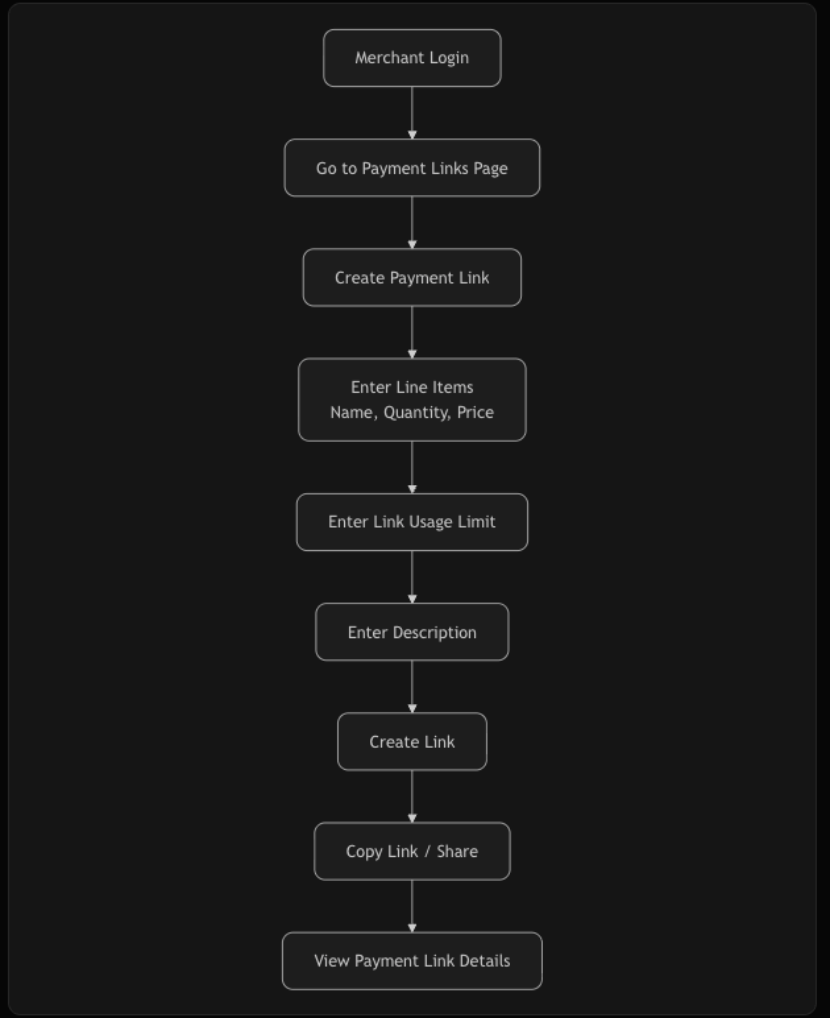
Login to the Astragate Merchant Dashboard.
-
Navigate to the Payment Links section.
-
Click "Create Payment Link".
-
Fill in the details:
a. Line Items Add one or more items with:
Item Name
Quantity
Unit Priceb. Link Usage Limit Example: Single use, 5 uses, etc.
c. Description Add a note visible to the customer. -
Click "Create".
-
Copy / Share the generated Payment Link.
-
Click "View Payment Link Details" to see the link details and usage statistics.
Example Payment Link Flow (Visual Summary)
Generated Link Format
https://dev.astragate.africa/s/YTR1enQ=
After Customer Pays
- The customer will be shown a success/failure page on our hosted checkout.
- You (the merchant) can track the payment in the Transactions or Payment Links dashboard.
Best Practices
- Always include clear item names and descriptions.
- Set a reasonable usage limit for security.
- Share via WhatsApp or SMS for best conversion.
- Monitor usage in the dashboard to prevent abuse.